Singapore Computer Repair Services Shop
Your Personal Onsite PC Repair Services Guy in Singapore
|
|||
History of USB PortEveryone that has used a PC or laptop will have used this ports without themselves knowing. The history of the USB port goes back to the period of 1990s where several connection interface exist such as serial port, parallel port, ps2, etc. With so many interfaces, a typical user will need different cables for each separate connection. USB(Universal Serial Bus) was created to standardize all the different interfaces, hence the word “universal” With the standardization of different interface, the USB port has more tasks to complete - to increase their transfer rate between the host and devices connected to it.
USB started off on specification USB1.0 in 1994, followed by USB1.1, and finally USB2.0 in 2000 The various transfer speed of the specification is as follows USB1.0 - 1.5Mbit/s USB1.1 - 12Mbit/s USB2.0 - 480Mbit/s
As of writing, USB3.0 Specification was in the midst of discussion and the transfer speed is rumored to be at 5000Mbit/s!! The increase in transfer speed was mainly meant for transferring of data between devices. As USB hard disk expands in capacity, and users are demanding for better video quality, naturally, video file sizes are increased. Thus the birth of USB3.0 The first commercial product released for USB flash drives, commonly known as thumbdrive, in 2000. Back then, flash storage was at a measly 128mb. At time of writing, 2009, 1.5TB (1,500GB or 1,500,000MB) already exists! If we were to transfer a single file of 5Gb on usb1.1 specs, on theory, we will need 3333s, which will take around 55min!! and 83s on a USB2.0 Specs. Over the years, different companies develop different interface for USB devices as well, which somehow defeats the purpose of standardizing a common interface. However, the problem of different interface was not as serious as it was back in 1990s.
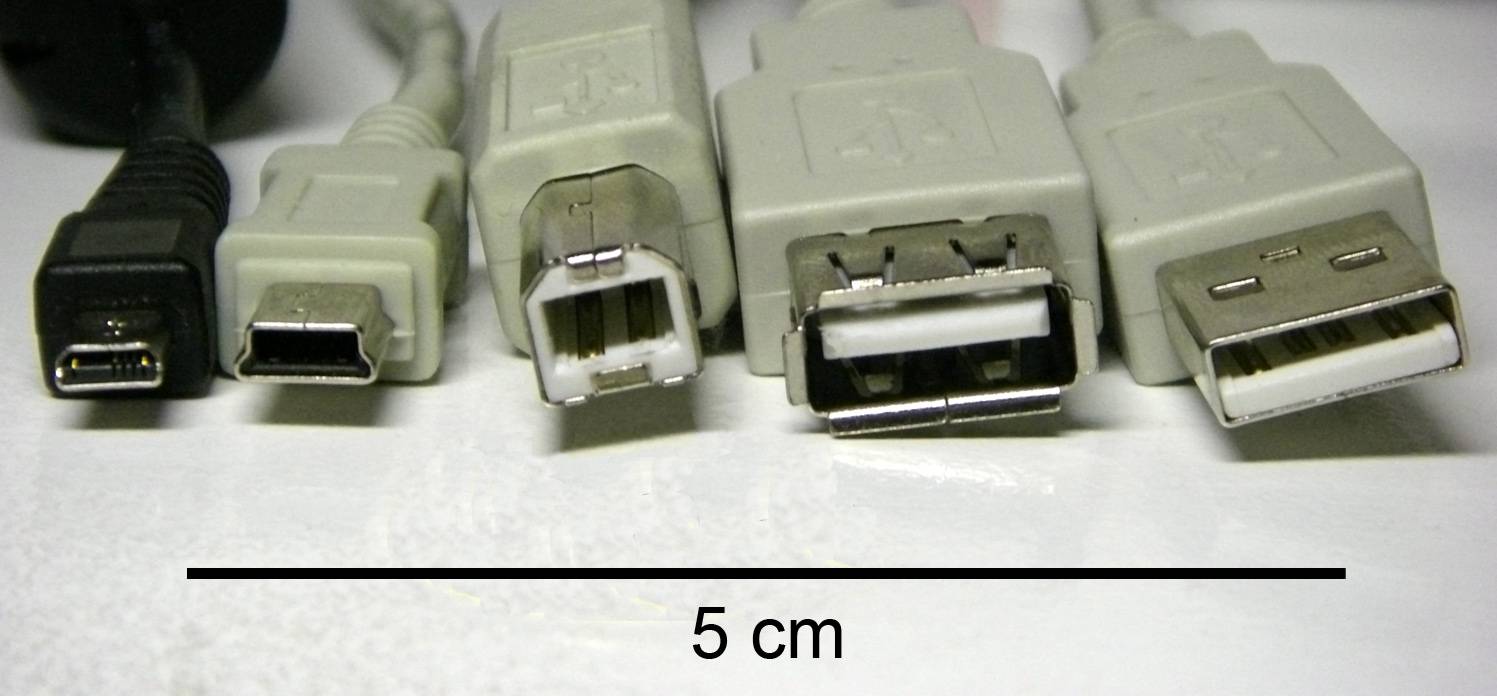
left to right: male micro USB, male mini USB B-type, male B-type, female A-type, male A-type) shown with a 5 cm scale.
USB cable was able to carry power and to power up devices such as thumbdrive, webcams, external hard disk, usb speakers, etc. However, power is capped at 5v, 100mA. USB cables suffer from a “useful” distance. Meaning, the maximum length of a usb cable is capped at 5m. Should the length be longer, the efficiency dropped and data may be corrupted. For PCs with limited USB ports, a hub, typically with 4 additional USB ports, may be purchased. This will indirectly increase 3 more USB ports on your computer. However, take note that the bandwidth and power of each port on the USB hub will be reduced, as all its bandwidth and power are sourced from a USB port. Common problems faced from using a USB hub, slower transfer rate and the inability to power up external 2.5” hard disk as they require more power as compared to a usb webcam or usb speaker. That is all to wrap up for the topic and history for USB. I hope that the above computer guide will assist you in having a further understanding of USB history.
Source : S-Mall Pte Ltd
| |||


|